Adding a Custom Block
This guide shows how to create an Enchanting Plus Table block with Anvil. It's written for Anvil beginners who already understand Minecraft concepts. Each step highlights what's necessary versus optional.
Define the Block
from anvil.api.blocks.blocks import Block

# Namespace is inferred from anvilconfig; only provide the short name here.
def enchanting_plus_table():
    block = Block("enchanting_plus_table")
    return block
Warning
Declare a Block with a unique name (e.g., "enchanting_plus_table"). Namespace comes from anvilconfig.
Server Description & States
from anvil.api.core.enums import ItemCategory

# Show the block in the creative inventory (optional)
block.server.description.menu_category(ItemCategory.Construction)
block.server.description.add_state("is_awesome", (False, True))
Note
Server‑side states are optional. If you don't define any, the block still exports and works.
Components — Visuals & Basics
from anvil.api.blocks.components import (
    BlockCollisionBox,
    BlockSelectionBox,
    BlockDisplayName,
    BlockMaterialInstance,
    BlockGeometry,
    BlockDestructibleByMining,
    InstanceSpec,
    InstanceVariant,
)
from anvil.api.pbr.pbr import TextureComponents

# Visuals (mandatory): geometry + at least one material instance
block.server.components.add(
    BlockCollisionBox((16, 12, 16), (0, 0, 0)),
    BlockSelectionBox((16, 12, 16), (0, 0, 0)),
    BlockDisplayName("Enchanting Plus Table"),
    BlockMaterialInstance().add_instance(
        InstanceSpec(
            blockbench_name="enchanting_plus_table",
            variations=[InstanceVariant(color="enchanting_plus_table")]
        )
    ),
    BlockGeometry("enchanting_plus_table"),
    BlockDestructibleByMining(1.5),
)
Blockbench references
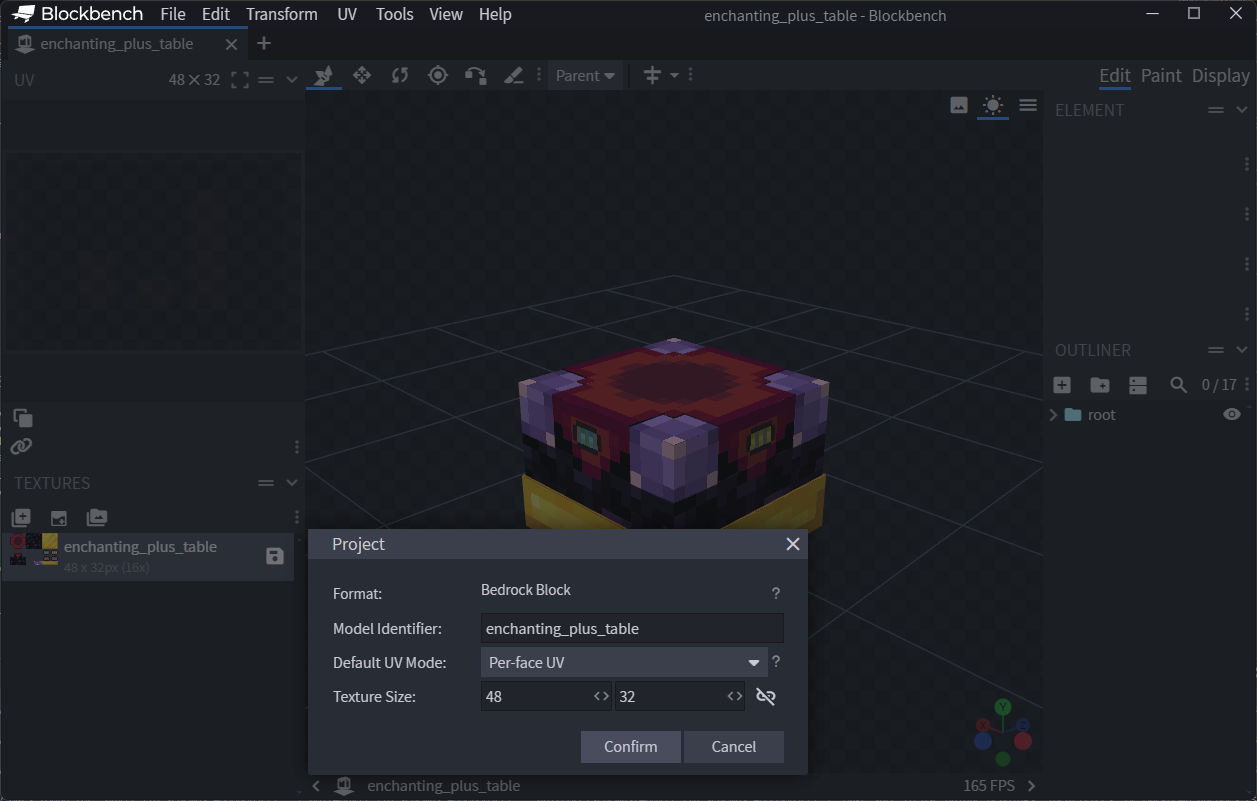
The identifier passed to BlockGeometry(...) must map to a Blockbench file under assets/blockbench, and its internal geometry/material names must match. Mismatches raise an export error.
PBR Support
InstanceVariant inherits from TextureComponents, so you can add PBR textures: InstanceVariant(color="block", normal="block_normal", mer="block_mer") for advanced rendering with normal maps and metalness/emissive/roughness channels.
Failure
Visuals are mandatory. Without a BlockGeometry and at least one material instance, the block won't export.
Crafting Recipe
from anvil.api.items.crafting import ShapedCraftingRecipe
from anvil.api.vanilla.items import MinecraftItemTypes
from anvil.api.vanilla.blocks import MinecraftBlockTypes

recipe = ShapedCraftingRecipe(block.name)
recipe.result(block.identifier, count=1)
recipe.ingredients([
    [MinecraftItemTypes.AmethystShard, MinecraftBlockTypes.EnchantingTable(), MinecraftItemTypes.AmethystShard],
    [MinecraftBlockTypes.GoldBlock(),    MinecraftBlockTypes.GoldBlock(),       MinecraftBlockTypes.GoldBlock()],
])
recipe.unlock_items([
    MinecraftItemTypes.AmethystShard,
    MinecraftBlockTypes.EnchantingTable(),
    MinecraftBlockTypes.GoldBlock(),
])
recipe.queue()
Note
Recipes are optional. If omitted, the block can still be obtained via creative inventory or commands.
Block Item
from anvil.api.items.components import ItemBlockPlacer, ItemDisplayName, ItemIcon, ItemMaxStackSize
from anvil.api.core.enums import ItemCategory
from anvil.api.pbr.pbr import TextureComponents

item = block.item
item.server.description.category(ItemCategory.Construction)
item.server.components.add(
    ItemMaxStackSize(64),
    ItemIcon(TextureComponents(color=item.name)),
    ItemBlockPlacer(block.identifier),
    ItemDisplayName("Enchanting Plus Table"),
)
Tip
The block's item is available as block.item. Accessing it auto‑creates a corresponding item.
Queue the Block
Success
Queuing is mandatory. If you don't call block.queue(), the framework will not export the block.
Queuing the block will also queue any associated item.
Queue groups
You can also group exports by calling block.queue("group") if you prefer a structured output directory.
Full Example — Enchanting Plus Table
from anvil.api.blocks.blocks import Block
from anvil.api.blocks.components import (
BlockCollisionBox,
BlockSelectionBox,
BlockDisplayName,
BlockMaterialInstance,
BlockGeometry,
BlockDestructibleByMining,
InstanceSpec,
InstanceVariant,
)
from anvil.api.items.components import ItemBlockPlacer, ItemDisplayName, ItemIcon, ItemMaxStackSize
from anvil.api.items.crafting import ShapedCraftingRecipe
from anvil.api.vanilla.items import MinecraftItemTypes
from anvil.api.vanilla.blocks import MinecraftBlockTypes
from anvil.api.core.enums import ItemCategory
from anvil.api.pbr.pbr import TextureComponents
def enchanting_plus_table():
block = Block("enchanting_plus_table")
block.server.description.menu_category(ItemCategory.Construction)
block.server.description.add_state("is_awesome", (False, True))
# Visuals (mandatory)
block.server.components.add(
BlockCollisionBox((16, 12, 16), (0, 0, 0)),
BlockSelectionBox((16, 12, 16), (0, 0, 0)),
BlockDisplayName("Enchanting Plus Table"),
BlockMaterialInstance().add_instance(
InstanceSpec(
blockbench_name="enchanting_plus_table",
variations=[InstanceVariant(color="enchanting_plus_table")]
)
),
BlockGeometry("enchanting_plus_table"),
BlockDestructibleByMining(1.5),
)
# Crafting recipe (optional)
recipe = ShapedCraftingRecipe(block.name)
recipe.result(block.identifier, count=1)
recipe.ingredients([
[MinecraftItemTypes.AmethystShard, MinecraftBlockTypes.EnchantingTable(), MinecraftItemTypes.AmethystShard],
[MinecraftBlockTypes.GoldBlock(), MinecraftBlockTypes.GoldBlock(), MinecraftBlockTypes.GoldBlock()],
])
recipe.unlock_items([
MinecraftItemTypes.AmethystShard,
MinecraftBlockTypes.EnchantingTable(),
MinecraftBlockTypes.GoldBlock(),
])
recipe.queue()
# Block item (optional)
item = block.item
item.server.description.category(ItemCategory.Construction)
item.server.components.add(
ItemMaxStackSize(64),
ItemIcon(TextureComponents(color=item.name)),
ItemBlockPlacer(block.identifier),
ItemDisplayName("Enchanting Plus Table"),
)
# Finalize (mandatory)
block.queue()
return block
EnchantingPlusTable = enchanting_plus_table()
Advanced Features
Now that you've created a basic block, here are some advanced features you can add:
Custom Ticking
Use the BlockTicker and BlockTick components to make your block execute logic periodically or randomly.
from anvil.api.blocks.components import BlockTick

# Add a random tick listener
block.server.components.add(
    BlockTick(interval_range=[10, 20], looping=True)
)
Custom Sounds
You can define custom sounds for your block using BlockSoundEvent.
from anvil.api.core.enums import BlockSoundEvent

# Add custom sounds
block.client.block_sound("my_sound", BlockSoundEvent.Break).add_sound("my_custom_sound")
Custom Components
For more complex logic, you can attach Custom Components. These are scripts that run in the game and can interact with the world.
from anvil import CONFIG
from anvil.api.blocks.components import BlockCustomComponents

class MyBlockLogic(BlockCustomComponents):
    _identifier = f"{CONFIG.NAMESPACE}:my_component"

    def __init__(self):
        super().__init__(self._identifier)

block.server.components.add(
    MyBlockLogic()
)
See the Custom Components Guide for details on how to implement the logic in TypeScript.
World Generation
To make your block generate naturally in the world, use the Features API. See World Features API for reference.